{"searchBar":{"inputPlaceholder":"Search by keyword or ask a question","searchBtn":"Search","error":"Please enter a keyword to search"}}
{}
{"support":{"yesButton":"Yes","noButton":"No","feedback":{"title":"What can we do to improve?"},"submitButton":"Submit","successMessage":"Thank you for your feedback","title":"Did this answer your question?","feedbackPercentLabel":"of people found this helpful","captcha":{"error":"Please check the box"}}}
Search FAQs
PROFIBUS International PROFIBUS DP Slave
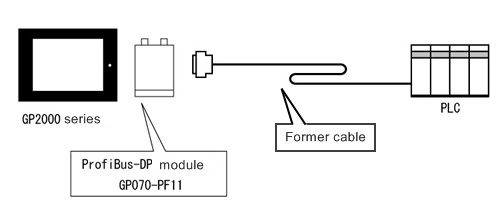
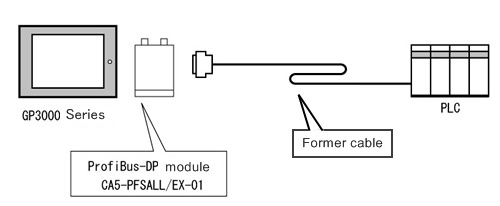
When replacing the cable used for GP2000/77R/70 series to GP3000 series
System Configuration Diagram of GP2000/77R/70 series
System Configuration Diagram after the replacement to GP3000 series
IImportant notes for the replacement from GP2000/77R/70 series to GP3000 series *Be sure to read here.
When replacing the hardware from GP2000/77R/70 series to GP3000 series, there are important notes shown below.
Important notes for replacement from ProfiBus-DP module (GP070-PF11) , GP2000/77R/70 series to ProfiBus-DP module (CA5-PFSALL/EX-01) , GP3000 series
For replacement from ProfiBus-DP module (GP070-PF11) for GP2000/77R/70 series to ProfiBus-DP module (CA5-PFSALL/EX-01) for GP3000 series, it's necessary to re-set HW Configuration of STEP7. After writing down the already set input/output settings, delete DP Slave and set Profibus DP Slave additionally.
For GP-Pro EX, assignment to LS Area cannot be performed with Direct I/O. If [GP Setup]-[Communication settings]-[DIO] is selected in GP-PRO/PB3 and the project file is converted in this condition, the following error message will appear.
Direct Input/Output ["LS" Devices] are not converted. Please use [Project] [Utility] [Convert Address] to convert them to PIW/PQW.
When [DIO] is selected, after conversion from LS to PIW/PQW by using Address Block Conversion, convert the project file to GP-Pro EX.