{"searchBar":{"inputPlaceholder":"Search by keyword or ask a question","searchBtn":"Search","error":"Please enter a keyword to search"}}
{}
{"support":{"yesButton":"Yes","noButton":"No","feedback":{"title":"What can we do to improve?"},"submitButton":"Submit","successMessage":"Thank you for your feedback","title":"Did this answer your question?","feedbackPercentLabel":"of people found this helpful","captcha":{"error":"Please check the box"}}}
Search FAQs

Operation settings for when the AC power supply is cut off and battery operation is carried out (for models equipped with a battery unit)

Applicable Models
PL3000 series (models with 4 expansion slots and Windows XP or Windows XP Embedded),
PS365xA series
The models equipped with a battery unit automatically switch to battery operation when an error occurs in the AC power supply. For the operation after the unit switches to battery operation, the specific setting as shown below is required.
Setting in the PL3000 series
Setting in the PS365xA series
Setting in the PL3000 series
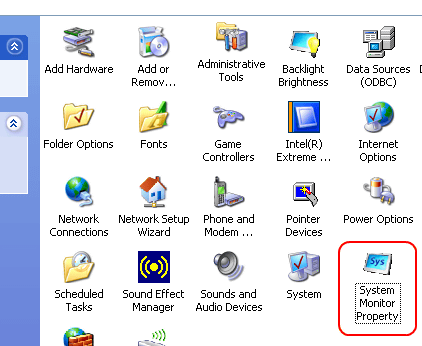
1.Open [Control Panel] -> [System Monitor Property].

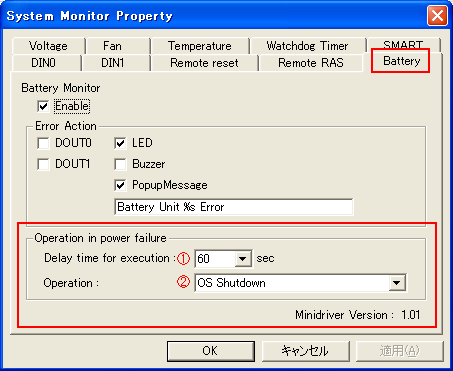
2.Click the [Battery] tab and select the settings in [Operation in power failure].

[1]Select the period of time until the operation selected in [Operation] of [2] below is executed after the AC power supply is cut off.
Setting range:0 - 60 seconds (factory default: 60 seconds)
[2]Select the operation to be executed after the AC power supply is cut off and the period of time specified in [1] passes.
[OS Shutdown]:Shut down the OS (factory default).
[Hibernate]:Hibernation should be enabled beforehand.
Open [Control Panel] -> [Power Options Properties] -> [Hibernate] to check [Enable hibernation].
MEMO
For details, please refer to "3.8.5 Battery" in the PL3000 Series Reference Manual.
Setting in the PS365xA series
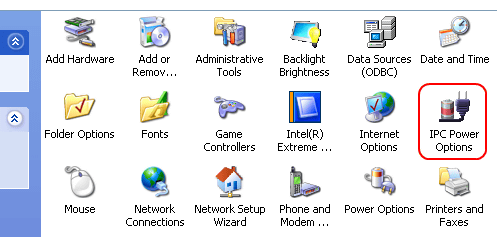
1.Open [Control Panel] -> [Power Options].

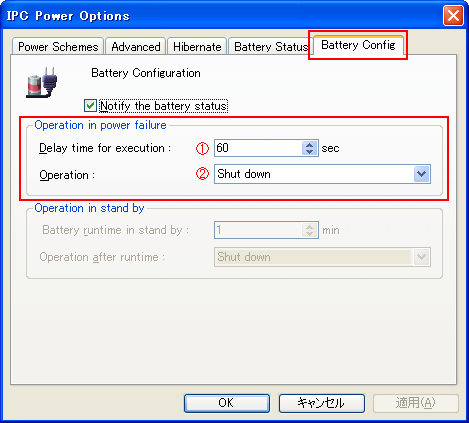
2.Click the [Battery Config] tab and select the settings in [Operation in power failure].

[1]Select the period of time until the operation selected in [Operation] of [2] below is executed after the AC power supply is cut off.
Setting range:0 - 60 seconds (factory default: 60 seconds)
[2]Select the operation to be executed after the AC power supply is cut off and the period of time specified in [1] passes.
[Stand by]:Open the system setting screen -> [Advanced] and select [None] in [Disable ACPI_Sx] in advance.
[Hibernate]:Open [IPC Power Options] -> [Hibernate] and check [Enable hibernation] in advance.
[OS Shutdown]:Shut down the OS (factory default).
MEMO
For details, please refer to "Chapter 3 Setting of IPC Power Options."