{"searchBar":{"inputPlaceholder":"Search by keyword or ask a question","searchBtn":"Search","error":"Please enter a keyword to search"}}
{}
{"support":{"yesButton":"Yes","noButton":"No","feedback":{"title":"What can we do to improve?"},"submitButton":"Submit","successMessage":"Thank you for your feedback","title":"Did this answer your question?","feedbackPercentLabel":"of people found this helpful","captcha":{"error":"Please check the box"}}}
Search FAQs
How to go to Offline Mode
How to go to Offline Mode
At Power ON
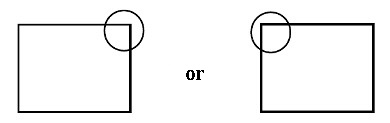
Touch the top-right or top-left corner (within 40 pixels of the edges) of the panel for at least 3 seconds after the startup screen is displayed.
When using GP-4100 series, touch the top-right or top-left corner (within 20 pixels of the edges) of the panel for 3 seconds.
At run time
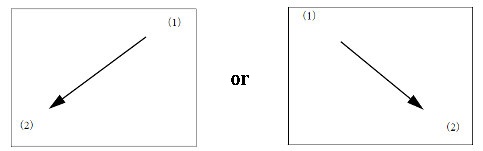
Touch the top-right then bottom-left corners, or the top-left and bottom-right corners of the panel (within a 40 pixel area) inside 0.5 seconds.
When using WinGP with the SP5000 Series Open Box (SP-5B40) or IPC Series, touch the panel (within a 40 pixel area) inside 5 seconds.
When using the GP-4100 Series, touch the panel (within a 20 pixel area) inside 0.5 seconds.