{"searchBar":{"inputPlaceholder":"Search by keyword or ask a question","searchBtn":"Search","error":"Please enter a keyword to search"}}
{}
{"support":{"yesButton":"Yes","noButton":"No","feedback":{"title":"What can we do to improve?"},"submitButton":"Submit","successMessage":"Thank you for your feedback","title":"Did this answer your question?","feedbackPercentLabel":"of people found this helpful","captcha":{"error":"Please check the box"}}}
Search FAQs
I want to add the division name and operator name in the operation log.
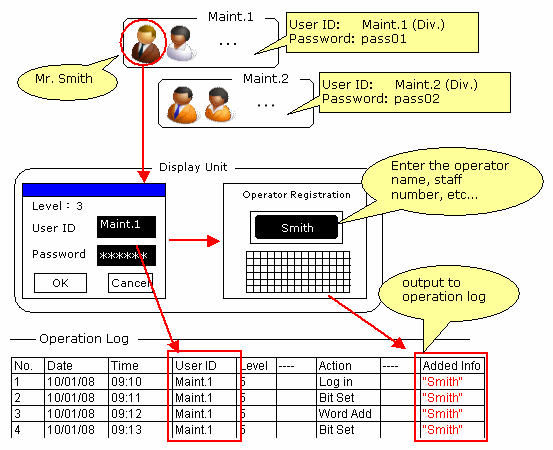
The Operation Log feature allows you to add texts and/or numeric data to the user ID. Using this feature, you can manage more detailed information, for example, by setting division names for the user ID and entering staff numbers for the text.
Example:
■ Setup Procedure
1.
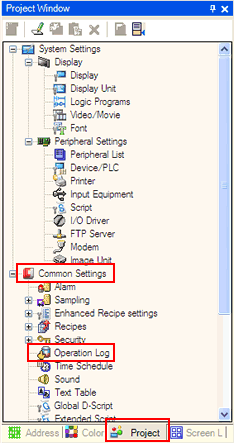
GP-Pro EX Ver. 3.0 or later:
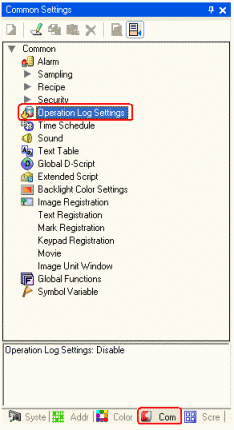
GP-Pro EX Ver. 2.7 or earlier:
In the [Project] window, select [Common Settings] -> [Operation Log Settings].
In the [Common Settings] window, select [Operation Log Settings].
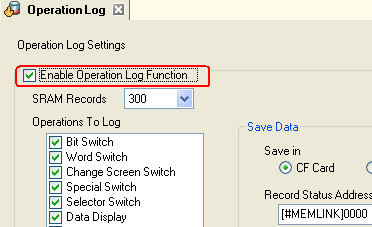
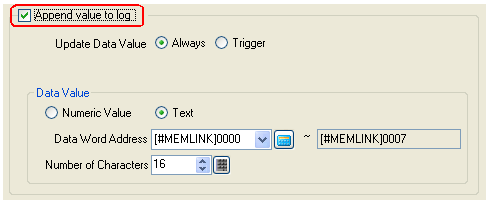
Check "Append value to log." The text or numeric data in the word address set here will be output to the operation log as an operator name or staff number.
NOTE
For the procedures of the operation log settings and the security settings, see the GP-Pro EX Reference Manual.