{"searchBar":{"inputPlaceholder":"Search by keyword or ask a question","searchBtn":"Search","error":"Please enter a keyword to search"}}
{}
{"support":{"yesButton":"Yes","noButton":"No","feedback":{"title":"What can we do to improve?"},"submitButton":"Submit","successMessage":"Thank you for your feedback","title":"Did this answer your question?","feedbackPercentLabel":"of people found this helpful","captcha":{"error":"Please check the box"}}}
Search FAQs
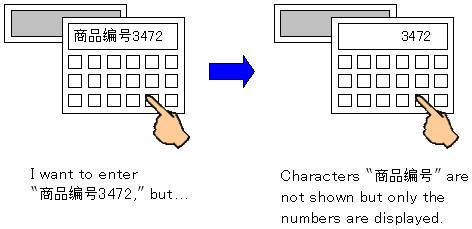
Some characters in the Image Font are not displayed correctly on [Input Display] of Data Display.
Example:
If you set the font type to the Image Font on the Input Display, some characters may not be displayed as described above. In this case, check if you have registered the characters as the Image Font beforehand.
* To display characters other than the following alphanumeric characters and symbols on a display part, registration is required.