

Removing the SD Card
If you remove the SD card while it is in use, you risk corrupting the data. Before removing the SD card from this product, stop all operations on the SD card.
- Make sure the SD card access LED is off, then open the
SD card slot cover. To open the slot cover, lightly push the edge
of the cover in the direction of the arrow.
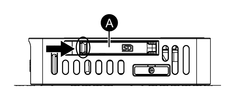

A. SD card slot cover
NOTE:-
When using a DIN Mount Type, open the SD card cover to find the SD card eject button. Press the eject button to Safely Remove Hardware. When this product and the SD card are disconnected, the SD card access LED turns off.
-
Do not hold down the SD card eject button. If you press and hold the eject button, the product will reboot. For more information, refer to Eject Button.
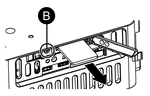
B. SD card eject button
-
- Push the SD card once to release, then pull out the card.NOTE: After using the SD card, store the SD card in its case or in another safe location.
- Close the SD card slot cover.