

Eject Button
The DIN mount type has two eject buttons, one for the SD card and one for the USB storage.
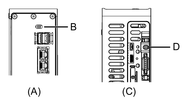
-
Front side
-
USB storage eject button
-
Bottom side
-
SD card eject button
Each eject button has two functions.
USB storage eject button
-
Pressing the eject button once enables you to Safely Remove Hardware. After the USB storage is disconnected (unmounted), the USB storage LED turns off.
-
If you power on the product while holding down the USB storage eject button, the product boots up with the default IP address and the System Settings is available for configuration. For more information, refer to Forgot IP Address.
SD card eject button
-
Pressing the eject button once will enable you to Safely Remove Hardware. When the SD card is disconnected (unmounted), the SD card access LED turns off. For SD card removal, refer to Removing the SD Card.
-
If you press and hold the SD card eject button for more than four seconds, the product will reboot. When the status LED turns off and then lights up red, release the eject button.