
GP6000-MM01-EN.00

Installing onto DIN Rail

DANGER
HAZARD OF ELECTRIC SHOCK, EXPLOSION, OR ARC FLASH
  • Remove all power from the device before removing any covers or elements of the system, and prior to installing or removing any accessories, hardware, or cables.
  • Unplug the power cable from both this product and the power supply prior to installing or removing the product.
  • Always use a properly rated voltage sensing device to confirm power is off where and when indicated.
  • Replace and secure all covers or elements of the system before applying power to this product.
  • Use only the specified voltage when operating this product. The DC model is designed to use 12 to 24 Vdc, and the AC model is designed to use 100 to 240 Vac. Always check whether your device is DC or AC powered before applying power.
  • When using this product in Class I, Division 2, Groups A, B, C, and D hazardous locations, install this product in an enclosure that prevents the operator from touching the back of this product without the use of tools.
Failure to follow these instructions will result in death or serious injury.
NOTE:
  • Use the rail compatible with IEC 60715 TH35-7.5 for this product.

  • In environments where this product will experience vibration and shock, it is recommended to secure this product to the DIN rail with commercially available DIN rail end stoppers after installation.

  1. With its backside facing up, place the product on a clean, flat, level surface.
  2. Attach the DIN rail attachment included in the package to the product. Insert the two protrusions of the DIN rail attachment into the holes on the back of the product. Then, tighten with the four M4 screws included. The necessary torque is 0.7 N•m (6.2 lb-in).
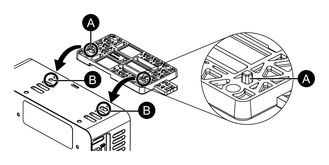
    A. Protrusion

    B. Holes

  3. Hook the top groove of the DIN rail attachment to the top part of the DIN rail.
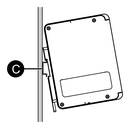
    C. DIN rail

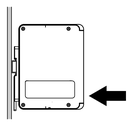
  4. Push the bottom part onto the rail until you hear a click.
Search Results (0)

Close