22.1 Settings Menu

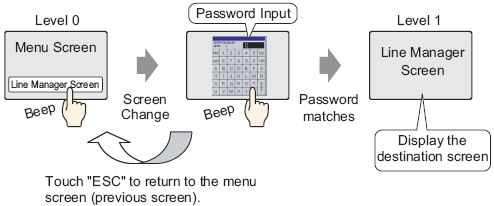
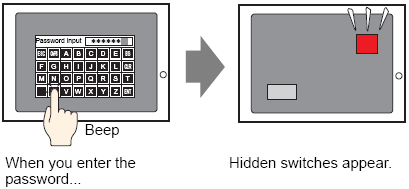
Creating Limited Access Screens

Overview 22.2 Creating Limited Access Screens

Steps 22.2.1 Creating Limited Access Screens


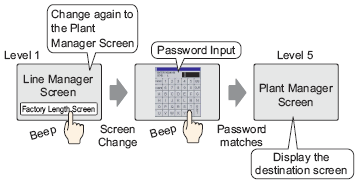
Limiting Screen Access by Authority

Overview 22.3 Limiting Screen Access by Authority

Steps 22.3.1 Procedure - Limiting Screen Access by Authority


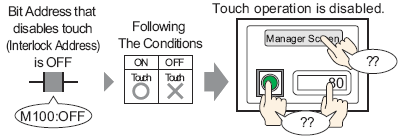
Disable All Touch Operations Based on Timing

Overview 22.4 Disable All Touch Operations Based on Timing

Steps 22.4.1 Procedure - Disable All Touch Operations Based on Timing


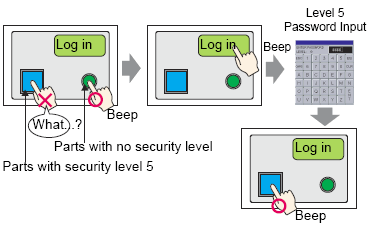
Creating a Screen with Limited Access Parts

Overview 22.5 Creating a Screen with Limited Access Parts

Steps 22.5.1 Procedure - Creating a Screen with Limited Access Parts


Show or Hide Parts and Drawings for Specific Users

Overview 22.6 Show or Hide Parts and Drawings for Specific Users

Steps 22.6.1 Procedure - Show or Hide Parts and Drawings for Specific Users


Save Operation History

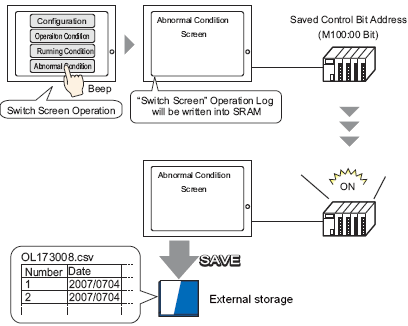
Overview 22.7 Save Operation History

Steps 22.7.1 Procedure - Saving Operation History

Saves the operation log in CSV format in the external storage.


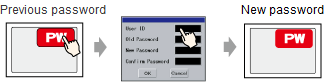
Changing the password from the password change screen

Overview 22.8 Editing Passwords Online

Procedure 22.8.1 Changing the password from the password change screen

Operation 22.8.2 Changing the Password from the Password Change Screen


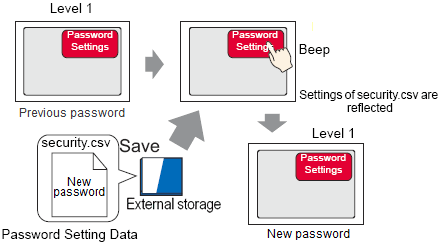
Changing the password using a CSV file

Overview 22.8 Editing Passwords Online

Procedure 22.8.3 Procedure - Changing the password using a CSV file


Logging in with Fingerprint Recognition

Overview 22.9 Logging in with Fingerprint Recognition

Procedure 22.9.1 Procedure - Registering fingerprints using the Fingerprint Recognition Setting Tool

Procedure 22.9.2 Procedure - Registering fingerprints online

  • The EZ Fingerprint Recognition Setup Tool and EZ Fingerprint Recognition Unit driver are not supported in Ver.5.00 or later. They are no longer provided in the GP-Pro EX installer.

Login using your Fingerprint.