

Removal Procedure
 DANGER DANGER |
|---|
|
HAZARD OF ELECTRIC SHOCK, EXPLOSION, OR ARC FLASH
Failure to follow these instructions will result in death or serious injury.
|
 CAUTION CAUTION |
|---|
|
RISK OF INJURY
Do
not drop this product when you remove it from the panel.
Failure to follow these instructions can result in injury or equipment damage.
|
| NOTICE |
|---|
|
EQUIPMENT DAMAGE
Failure to follow these instructions can result in equipment damage.
|
- Loosen, in small increments, the M4 screws of installation
fasteners in opposite corners to eventually remove the screws.NOTE: For the number of installation fasteners on your model, refer to Number of Installation Fasteners in step 3 of Installation Procedure.
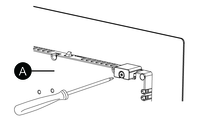
-
Rear side
-
- Press the Unlock button at the top of the product to depress
the anti-drop lock, then slowly remove the product from the panel.
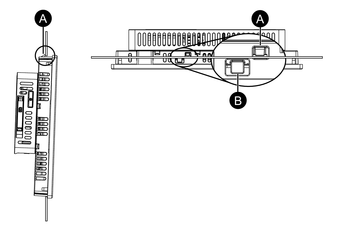
-
Anti-drop lock
-
Unlock button
-