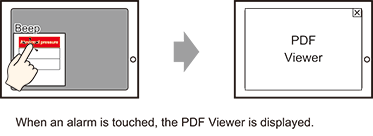
19.6.3 Procedure - Displaying Help (Sub Display)/Show PDF Viewer

  1. Create a PDF Viewer to call a Sub Display. For information on the setup procedure, see the following.
    28.2.1 Procedure - Displaying and Operating a PDF from the Display Unit

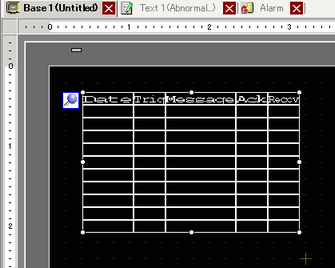
  2. Set up the alarm part to display alarms. Open the screen to display the Alarm (for example, Base 1), and in the [Parts (P)] menu, select [Alarm (A)], or click , and place the Part on the screen.

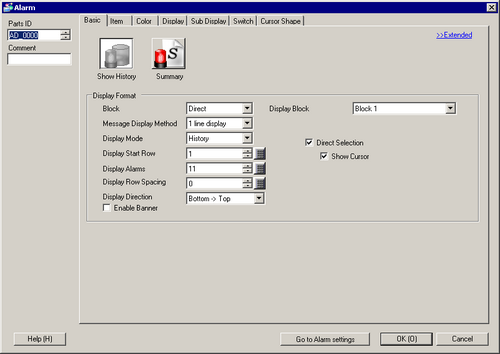
  1. Double-click the placed Alarm. The Alarm dialog box appears.

  2. For the alarm, select the Block and the Display Mode.

  1. Set the [Display Start Row], [Display Alarms] and [Display Row Spacing].

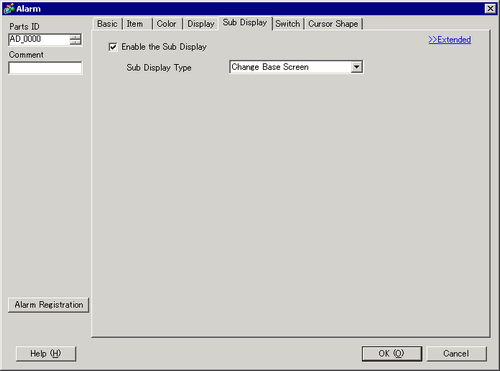
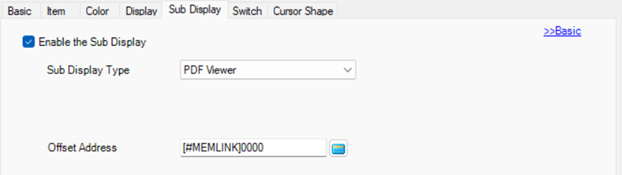
  1. Click the [Sub Display] tab, and select the [Enable the Sub Display] box.

  2. Click [Extended].

  3. In the [Sub Display Type] list, select [PDF Viewer].

  4. Set the [Offset Address].

  1. As needed, use the [Item] tab, [Color] tab, and [Display] tab options to change alarm message's number of display characters, text color, background color, font, and size. Click [OK]. Set up is now complete.