Properties
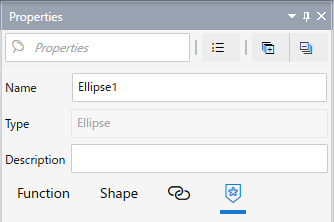
Using the [Properties] window, you can set the attributes of the selected item.
Click tab names to view its associated properties. Inside a tab may be sub tabs. Click sub tab names to view its associated properties.
At the top of the window, use the Search field to find and filter items that match the search word. Filtered search words are highlighted.
Use the [Expand All] and [Collapse All] icons to expand or collapse object categories.
Property
|
Property |
Description |
| Name |
Enter a name of object. Refer to Naming Conventions. |
| Type |
Displays the type of object. This property is read-only. |
| Description |
Enter the description of object.
|
Icon
|
Icon |
Description |
 |
Displays properties organized into tabs and sub tabs. |
 |
Displays properties in a single view, one property after another. |
 |
Expands the view of collapsed properties. |
 |
Collapses the view of expanded properties. |
 |
Displays properties in the selected item that are referenced by other items. |
 |
Displays properties marked as a favorite |
 .
.