

Parts Identification (7-inch Wide)
|
Front |
 |
|
Top |
 |
|
Bottom |
 |
|
Rear |
 |
|
A: Status LED |
I: USB/SD slot cover |
|
B: Hanger |
J: SD card slot |
|
C: Navigator*1 |
K: USB (Type-A) interface |
|
D: Operation switch (OP)*1 |
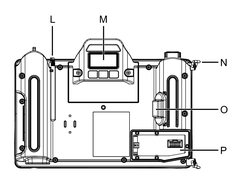
L: Touch pen |
|
E: Function keys (F1...F13)*1 |
M: Magnetic holder |
|
F: Emergency stop switch*2 |
N: Hand strap hook |
|
G: Key switch |
O: Enabling switch*2 |
|
H: Security seal*3 |
P: Dedicated cable installation opening*4 |
*1 Program the operation of each key using the screen editing software. When the operation switch function is enabled in the screen editing software, this product accepts inputs from the touch panel or function keys only while the operation switch is pressed. For details, refer to the manual of the screen editing software.
*2 For safety function parameters, refer to Product Overview.
*3 For details, refer to Security Seal.
*4 For instructions on how to install the cable, refer to Installing the Dedicated Cable.