

Network Rate Limiter
Enable to create rules to limit the maximum number of packets transmitted through the network interface. Restricting the number of requests that can be sent within a specific time frame helps to prevent network overload. This is also effective as a cybersecurity measure to suppress unintended excessive traffic, such as DDoS attacks and spam.
Default: Off
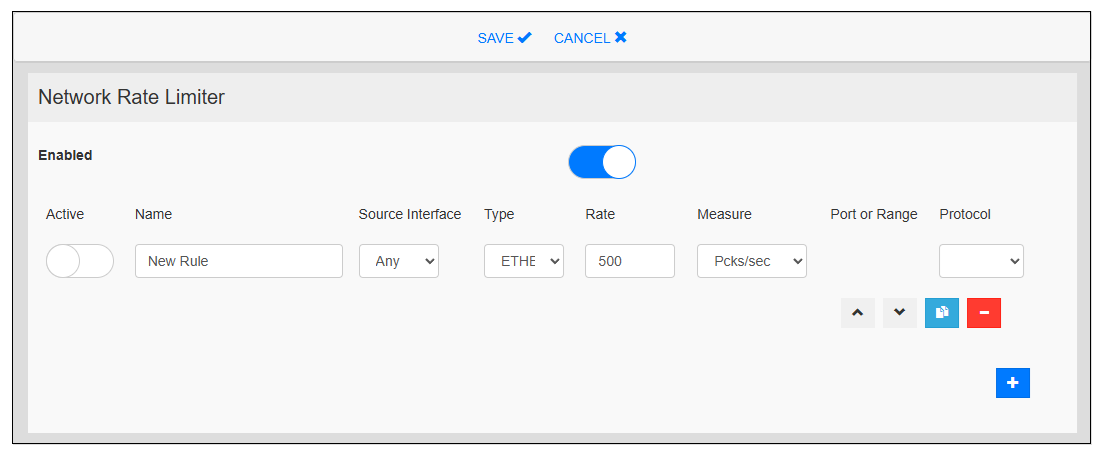
|
Item |
Description |
|---|---|
| Active |
Toggles between enabling and disabling the rule. Default: Disable |
| Name |
Set a label to identify the rule. |
| Source Interface |
Specifies the network interface for the rule. |
| Type |
Select the data type of network packets to filter: ETHER, IP, SYN, or UNI |
| Rate |
Set the amount of data or number of packets allowed per time unit. |
| Measure |
Select the measurement unit. Pcks/sec: packets per second Pcks/min: packets per minute Mbps: megabits per second |
| Port or Range |
Set the port or port range for the filtering of TCP or UDP protocols. Example setting a port range: 20-40 |
| Protocol |
Select the protocol type to match the data type. ETHER: IPV4, ARP IP: IPV4, TCP, UDP, ICMP |