

Parts Identification (10, 12, 15-inch Model)
|
Front |
 |
|
Left |
 |
|
Bottom |
 |
|
Rear |
 |
|
A. Front USB cover |
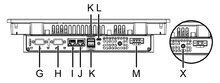
M. Power connector |
|
B. Front USB (Type-A) interface*1 |
N. Expansion unit interface*3 |
|
C. Front USB (micro-B) interface*1 |
O. Status LED (STA) |
|
D. Status LED (front LED) |
P. Error LED (ERR) |
|
E. Battery slot |
Q. COM1 LED (COM1) |
|
F. SD card slot cover |
R. COM2 LED (COM2) |
|
G. Serial interface (COM2) |
S. USB storage LED (USB) |
|
H. Serial interface (COM1) |
T. SD card access LED (SD) |
|
I. Ethernet interface (ETH2)*2 |
U. Safety alert symbol*4 |
|
J. Ethernet interface (ETH1) |
V. Safety alert symbol*5 |
|
K. USB (Type-A) interface (x 2) |
W. Safety alert symbol (AC model only)*6 |
|
L. USB (micro-B) interface |
X. PE terminal (used for AC model only) |
*1 The factory default for the Front USB ports (Type-A and micro-B) is disabled. To enable it, change the setting in the System Settings. For details, refer to Display.
*2 The factory default for the ETH2 port is disabled. Use the System Settings to change it. For details, refer to Ethernet.
*3 This interface is currently unavailable.
*4 Identifies the safety messages about the battery in Replacing the Battery.
*5 Identifies the safety messages about the USB (micro-B) interface in Cable Connections.
*6 Identifies the safety messages about the power wiring in Wiring the Power Supply.