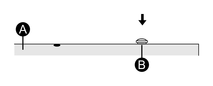

Isolation Unit Installation Procedure
You can install the Isolation Unit to the back of this product or to the installation panel. For details such as settings when using the Isolation Unit, refer to the product manual.
 DANGER DANGER |
|---|
|
HAZARD OF ELECTRIC SHOCK OR EXPLOSION
Prior to connecting the Isolation Unit to this product,
confirm that this product's power supply is completely turned OFF.
Failure to follow these instructions will result in death or serious injury.
|
| NOTICE |
|---|
|
EQUIPMENT DAMAGE
Do not exert more torque than the amount specified.
Failure to follow these instructions can result in equipment damage.
|
NOTE:
-
Install the Isolation Unit to a stable surface.
-
Do not leave the Isolation Unit hanging by its cord.
-
Be careful with wire placement. Overlapping cords may cause noise.
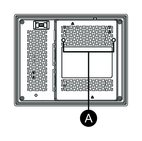
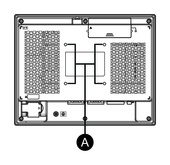
- Check the locations of two screw holes on the rear of this
product.
5-inch/7-inch model
10-inch/12-inch model
-
Screw holes
-
- Install one of the two attachment screws included in the Isolation Unit to this product. Use a torque of 0.5 N•m (4.4 lb-in).
- Attach the Isolation Unit to this product.
- Slide the Isolation Unit in the direction of the arrow so the Isolation Unit is hooked by the screw from Step 2.
- Secure the Isolation Unit in place with another attachment screw. Use a torque of 0.5 N•m (4.4 lb-in).