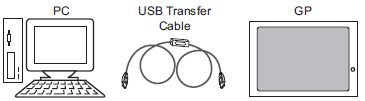
Use a USB cable to connect the computer and display unit, and transfer project files.
You can use the following USB cables.
|
Display Unit |
USB cable |
|
IPC Series (PC/AT) |
Optional USB data transfer cable (CA3-USBCB-01) |
|
SP5000 Series* GP4000 Series LT4000 Series |
Use one of the following cables
|
|
GP6000 Series* ST6000 Series STC6000 Series ET6000 Series |
Use one of the following cables
|
*The front USB port is disabled at the time of purchase and cannot be used for transfer as is. For details and how to enable the front USB port, refer to the following.
 1.4.3.1 For Those Using the SP5000 Series
1.4.1.1 For Those Using the GP6000 Series (Advanced Models)

For information about the specifications or installation of the USB transfer cable, refer to the Installation Guide included in the USB cable package.
When using an optional USB data transfer cable (ZC9USCBMB1/PFXZUSCBMB2) or a commercially-available USB cable (Type A mini B/Type A micro B), connect the large plug (Type A) to the computer and the small plug (mini B/micro B) to the display unit.
You cannot download to multiple display units at one time from a computer.
As shown in the following, do not connect multiple USB cables that are the same model to the computer.
Connecting 2 or more CA3-USBCB-01 cables
Connecting 2 or more ZC9USCBMB1, or 2 or more commercially available (Type A mini B) cables
Connecting both ZC9USCBMB1 and commercially available (Type A mini B) cables
Regardless whether or not you are transferring, when connecting the SP5000 Series Open Box (SP-5B41/SP-5B411/SP-5B412) and the computer with a USB transfer cable, do not connect another USB transfer cable to the computer.
Transfer from PC to Display Unit (Send)
You can send the selected project files to the display unit to display the project.
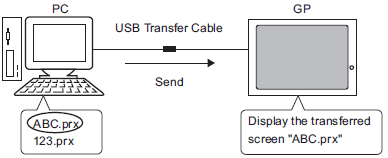
34.2.1 USB Transfer - Transferring from Computer to Display Unit (Send)
Transfer from Display Unit to PC (Receive)
Project data stored in the display unit can be saved to the PC as a new project file
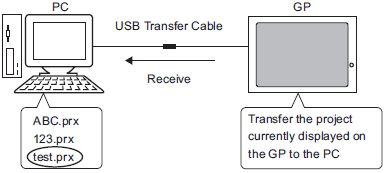
34.2.2 USB Transfer - Transferring from Display Unit to Computer (Receive)