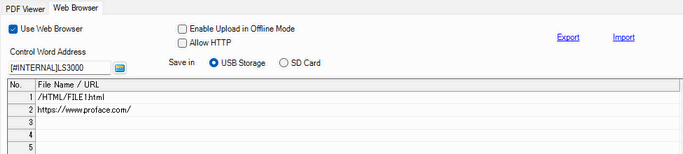
Use the Web Browser
Specify whether to use the Web Browser.
Enable Upload in Offline Mode
You can upload the HTML file and webpage list in offline mode.
 M.17.8.5 External File Operation - HTML File Load List
Allow HTTP
Select the check box to set a URL with the http protocol. Uncheck the box to use only https.
Control Word Address
Specify the control word address for displaying/hiding the Web Browser and selecting the HTML or webpage to display. Use a sequence of 2 Words from the specified address.
28.3.3 Control Word Address for Web Browser
Save in
Set where to save the HTML files.
No.
Set the registration number of the HTML file or webpage from 1 to 1000.
File Name/URL
Set the paths and file names of the HTML files. Separate directories with "/" (slash). Add "/" to the beginning of the path.
Example:
/test.html
/HTML/FILE1.html
Enter the URL starting with the protocol, such as https.
Example:
https://www.proface.com/

Use only single-byte alphanumeric characters and symbols (_.,-) for the file name. You can use up to 255 characters.
Confirm that the displayed HTML or webpage is secure.
Export/Import
Export and import the HTML file and webpage list in the CSV format.