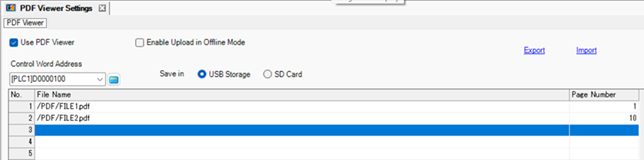
Use PDF Viewer
Specify whether to use the PDF Viewer.
Enable Upload in Offline Mode
You can upload the PDF file list in offline mode.
 M.17.8.4 External File Operation - PDF Viewer
Control Word Address
Specify the control word address for displaying/hiding the PDF Viewer and selecting the PDF to display. Use a sequence of 2 Words from the specified address.
28.2.3 PDF Viewer Control Word Address
Save in
Set where to save the PDF files.
No.
Set the registration number of the PDF files from 1 to 1000.
File name
Set the paths and file names of the PDF files. Separate directories with "/" (slash). Add "/" to the beginning of the path.
Example:
/test.pdf
/PDF/FILE1.pdf

Use only single-byte alphanumeric characters and symbols (_.,-) for the file name. You can use up to 255 characters.
Page Number
Set the page number to display when the PDF is opened in the PDF Viewer from 1 to 65535.
If you set a page number that exceeds the number of pages in the PDF, the last page is displayed.
Export/Import
Export and import the PDF file list in the CSV format.