
Use the two consecutive words from [Control Word Address] to control displaying/hiding the PDF Viewer and selecting the PDF to display.
Control
Show or hide the PDF Viewer.
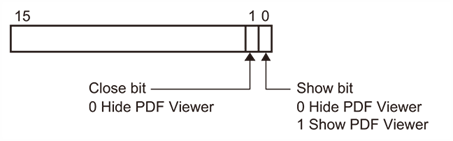
When bit 0 is ON, the PDF Viewer is displayed. After the operation, it is turned OFF.
When bit 1 is ON, the PDF Viewer is closed. After the operation, it is turned OFF.
When bit 0 and bit 1 are ON at the same time, the PDF Viewer is not displayed and both bits are turned OFF.
File Number
The PDF with [No.] in the PDF Viewer settings that matches the value stored here is displayed.