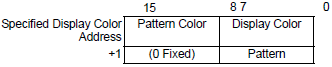
In the [Color] tab's Extended settings, you can specify the graph color indirectly by setting [Color Specification] to [Address]. You can change the graph color from a device/PLC.
In the address set in [Display Color], the bottom 8 bits store the color code, and the top 8 bits store the pattern color code.
In the next address after [Display Color], the lower 8 bits store the pattern code.

In the [Basic] tab, if you clear the [Show Fill] check box the top 8 bits of the [Display Color] address store the color code for the background color.
 18.12.1.1 Normal Graph - Basic
When using a pattern, if you set the [Pattern Color] to [Black] (or color code 255) and [Blink] to [Medium], the display will become transparent and may not show correctly. The same is also true when [Pattern] is [None], and you set [Background Color] to [Black] (or color code 255) and [Blink] to [Medium].
Color Code
The color code is the number displayed on the color palette.
7.3.1 Setting Colors
Pattern Code
|
Stored Value |
0 |
1 |
2 |
3 |
4 |
5 |
6 |
7 |
8 |
|
Pattern |
|
|
|
|
|
|
|
|
|
For example, Display Color = D100