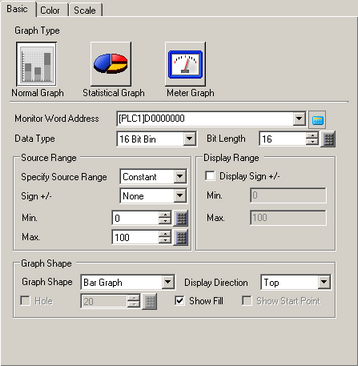
Monitor Word Address
The data stored in this Word Address displays in the graph.
Data Type
Select the graph display data type from [16 Bit Bin], [16 Bit BCD], [32 Bit Bin], [32 Bit BCD], or [32 Bit Float].
Bit Length
If [Data Type] is [16 Bit Bin], set the data's enabled bit length from 1 to 16.
Source Range
Specify Source Range
Select the method for specifying the maximum and minimum values for the source data.
Constant
Specify a set constant as the Min/Max.
Address
Specify the address where the Min/Max values are stored.
Sign +/-
Set whether graph display data can handle negative numeric data. This can only be set when the [Data Type] is [16 Bit Bin] or [32 Bit Bin].
None
Only positive numeric data will be handled.
2's Complement
Negative numbers are handled with 2's complement.
MSB Sign
Negative numbers are handled with MSB sign.
Min. Value/Max. Value
Set the source data for graph display data.
If [Specify Source Range] is [Constant], enter the maximum / minimum values.
If [Specify Source Range] is [Address], specify the word address where the min/max value is stored.
The setup range is different depending on the [Data Type] and [Specify Source Range] values.
|
Data Type |
Sign +/- |
Range |
|
16 Bit Bin |
None |
0 to 65535 |
|
2's Complement |
-32768 to 32767 |
|
|
MSB Sign |
-32767 to 32767 |
|
|
32 Bit Bin |
None |
0 to 4294967295 |
|
2's Complement |
-2147483648 to 2147483647 |
|
|
MSB Sign |
-2147483647 to 2147483647 |
|
|
16 Bit BCD |
- |
0 to 9999 |
|
32 Bit BCD |
- |
0 to 99999999 |
|
32 Bit Float |
- |
-9.9e16 to 9.9e16 |

The corresponding [Specify Source Range] in the word address is converted as a ratio of 1000 for display in the graph.
Display Range
Display Sign +/-
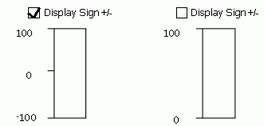
Set to display negative numbers. This can be set when the [Data Type] is [Bin] or [Float].
For example, for a Bar Graph
Min./Max.
Shows the display range's Min and Max. If [Display Sign +/-] is set, the Min is "-100". If it is not set, the Min is "0". The Max is fixed as "100".
Graph Shape
Graph Shape
Choose the graph shape from [Bar Graph], [Circle Graph], [Semicircle Graph], and [Tank Graph].
Display Direction
Set a direction for the graph display. If the [Graph Shape] is [Bar Graph] or [Tank Graph], choose from [Top], [Bottom], [Left], or [Right]. For [Circle Graph] and [Semicircle Graph], the starting point is fixed at the top and rotates clockwise.
Hole
When the [Graph Shape] is [Circle Graph] or [Semicircle Graph], set the radius of the inner circle.
If you set the radius of the inner circle to less than 20 dots, the graph may not be properly displayed.
Show Fill
Set whether to display a fill in the graph. If you do not want to display a fill, the graph is set to a Meter Graph.
Show Start Point
If the [Graph Shape] is [Circle Graph] or [Semicircle Graph] and [Show Fill] is not set, select whether to display the start point.