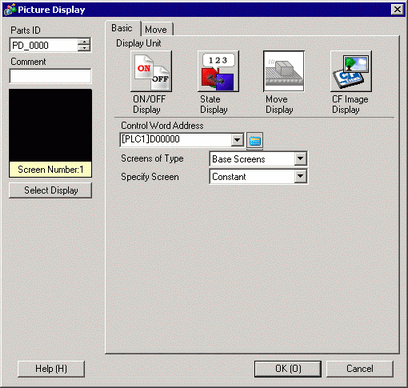
Control Word Address
Set the word address which stores the move amount. It moves and displays a screen picture in response to the stored data.
Screens of Type
Select the screen type to display.

With move display, a screen to be called displays with the center overlapping the coordinate position (display position) set on the picture display.
Base Screen
Displays a base screen.
Image (Display Unit)
Displays an image screen.
Image CF/Image SD/Image USB
Displays the image screen saved to the external storage.
[Image USB] can be selected when using models that do not support CF cards or SD cards. When [Image USB] is selected, the image data is managed separately from the regular USB storage destination folder. See the following for the destination folder settings.
 3.8.2.5 Project Information - Destination
Mark
Displays a picture registered in the Mark Screen.
Specify Screen
Select the designation method of a screen to display from [Constant] or [Address].
Constant
A Mark Screen to display is fixed. Click [Select Display] and specify the screen you want to display.
Address
The picture on the display screen is variable. Using the Screen Number Specification Address allows you to dynamically change the screen picture.
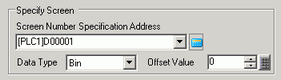
Screen Number Specification Address
Set the address where the screen number to display is stored.
Data Type
Select the display screen word address data type from [Bin] or [BCD]. Not displayed when [Mark] is selected in the [Screens of Type].
Offset Value
Set the offset value. A screen picture with the offset value added to the screen number stored in the display screen number address will display.