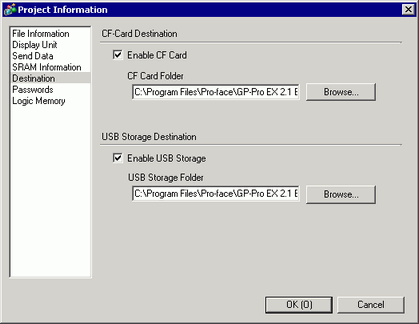
Specifies the save-in location of the data to be transferred to external storage on the display unit.

When using display units that support the SD card, "CF"/"CF Card" is replaced with "SD"/"SD Card".
When using models that do not support CF cards or SD cards, the display of "CF"/"CF Card" is replaced with "[Image USB] Function".
The functions whose data are managed in the "'Image USB' Functions Folder" are as follows. The data of the other functions are managed in the "USB Storage Folder".
Call Screen 7.6.5 Using a Screen Multiple Times (Call Screen)
Common Settings (Image Registration) 8.5 Common Settings (Image Registration) Settings Guide
Picture Display8.6 Picture Display Settings Guide
Enable CF Card / Enable SD Card / Enable "Image USB" Function
Select whether to use external storage in the project.
CF Card Folder / SD Card Folder / "Image USB" Functions Folder
Specifies the location to store data you save in external storage. Click [Browse...] to display the dialog box that designate the directory.
Enable USB Storage
Select whether to use USB storage in the project.
USB Storage Folder
Specifies the location to store data you save in USB storage. Click [Browse...] to display the dialog box that designate the directory.