Screen and Content Display
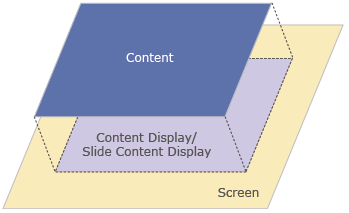
[Screen] is displayed directly on the display unit and [Content] is loaded on the screen for display.
- Screen
The screen is the base onto which all objects are drawn. - Contents
By placing a Content Display or Slide Content Display object on the screen, you can load content into the defined area. Content objects are suitable for information that is commonly used on multiple screens and for information that is referenced temporarily, such as a window display.
You can create nine types of screens/content for different operation processes or placement functions. For more information, refer to Types of Screens.
- You can add operation/placement functions to a part of the screen/content area. For more information, refer to About Layout Objects.