{"searchBar":{"inputPlaceholder":"Search by keyword or ask a question","searchBtn":"Search","error":"Please enter a keyword to search"}}{}{}STW6000 / How can I check the connection with connected web server?
You can conduct a communication test with each registered web server at Configuration MENU.
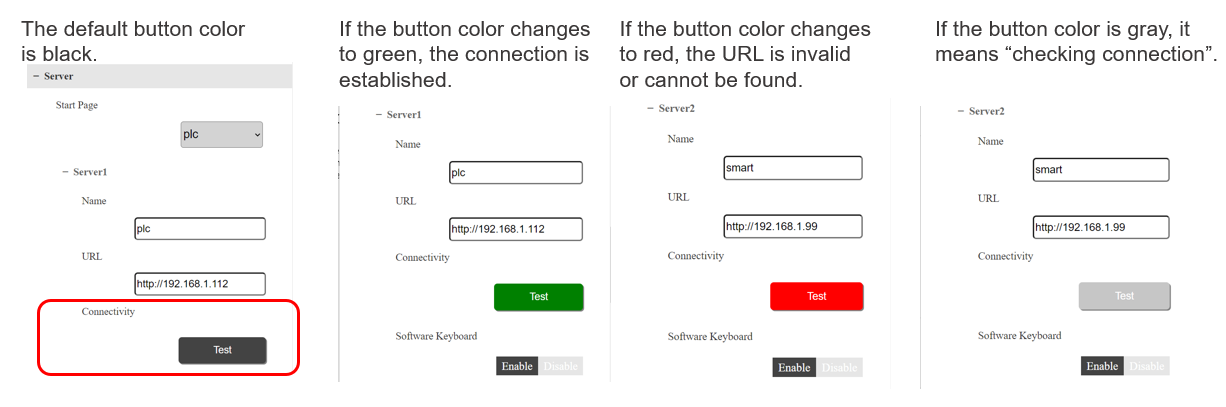
Go to [Configuration MENU] > [Server], and touch [Test] button at [Connectivity] of the connected server you want to check communication.
The color of the [Test] button changes according to the communication status.
This fuction is supported by System Version V1.1.0 or later.
How to update the system: refer to FAQ No. FA404725.
How to check the current system version: refer to FAQ No. FA404723.
Go to [Configuration MENU] > [Server], and touch [Test] button at [Connectivity] of the connected server you want to check communication.
The color of the [Test] button changes according to the communication status.
This fuction is supported by System Version V1.1.0 or later.
How to update the system: refer to FAQ No. FA404725.
How to check the current system version: refer to FAQ No. FA404723.
Did this answer your question?