| Setup procedures to synchronize screens on GP-Viewer EX with screens on the GP are as follows. |
|
| 1. | GP-Pro EX Ver. 3.0 or later: | GP-Pro EX Ver. 2.7 or earlier: |
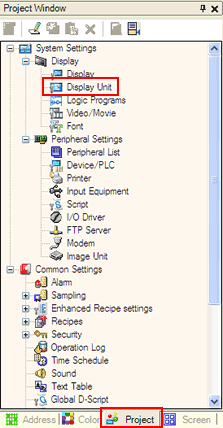
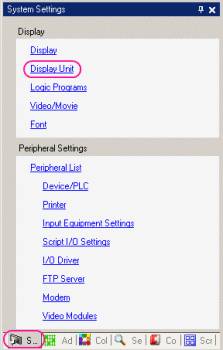
| Start up GP-Pro EX.
In the [Project] window, click [Display Unit]. | Start up GP-Pro EX.
In the [System Settings] window, click [Display Unit]. |
|  |  |
| |
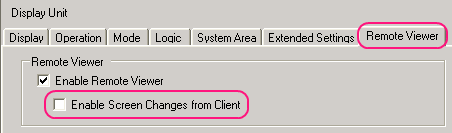
| 2. | On the [Remote Viewer] tab, check off "Enable Screen Changes from Client" in the Remote Viewer area. |
|  |
| |
| 3. | Save the settings and transfer screen data. |
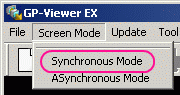
| 4. | Start up GP-Viewer EX and set "Synchronous Mode" for Screen Mode. |
|  |
|
| NOTE | | As for the screen synchro system, please refer to the following comparisons with GP-Viewer. | | GP-Viewer | GP-Viewer EX | Description | | Asynchronous | Asynchronous Mode | Enables to switch screens on the PC (client). Switching a screen on the PC does not synchronize with a screen on the GP. | | GP Synchronous | Synchronous Mode
+
Above Settings | Disables to switch screens on the PC (client). Switching a screen on the GP synchronizes with a screen on the PC. | | Full Synchronous | Synchronous Mode | Enables to switch screens on the PC (client). Switching a screen on the PC synchronizes with a screen on the GP, and also switching a screen on the GP synchronizes with a screen on the PC. |
|
|
|