Error Contents
| Onthe screen of GP3000 series, (Device name):UDP target not found (IP address: (IP address)) is displayed. |
Causes and countermeasures
| | Causes | | 1. | Unable to recognize the device's IP address. | | 2. | Please check if the device's power is OFF, HUB's power is OFF, or cable is unpluged. |
|
| Countermeasures | | Please check if the network environment is normal.
Please specify the cause via procedures such as directly connecting PC, GP and device/PLC, and then checking if IP address is recognized via PING command. |
|
|
Confirmation via PING command | In your PC, select [Start]→[Program]→[Accessories]→DOS Prompt (Command Prompt).
Then input
ping (Device's IP address)
and press ENT key. | |
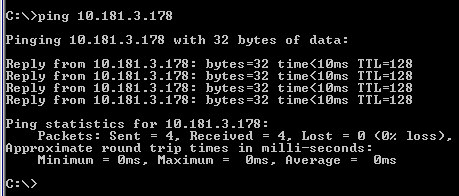
| | If it displays "0%loss", the network environment has no problem. If it displays "100%loss", it is not communicating correctly. Please check the network environment. |
|
