
x.509 Certificate
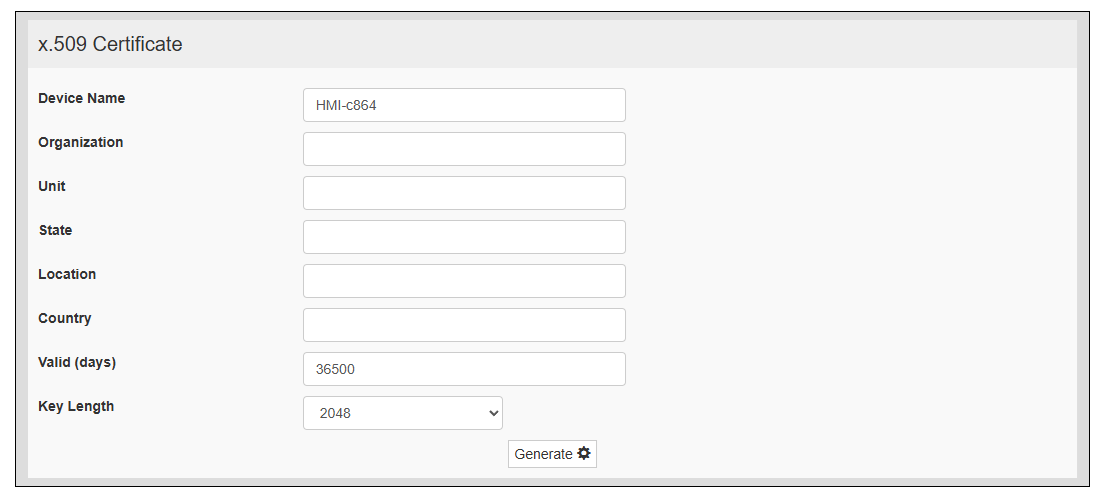
Personalize your product's x.509 certificate.
|
Item |
Description |
|---|---|
| Device Name |
The name of your device |
| Organization |
The legal name of your organization |
| Unit |
The division of your organization handling the certificate |
| State |
The state/region where your organization is located |
| Location |
The city where your organization is located |
| Country |
The two-letter ISO code for the country where your organization is located |
| Valid (days) |
Validity of the certificate |
| Key Length |
The number of bits in the cryptographic key |
| Generate |
Generate a self-signed certificate with your data |
The product uses a self-certificate to encrypt the Internet communication through the HTTPS protocol. You can personalize the certificate with the data of your company and ask a certificate authority to authenticate it.
The procedure to personalize and authenticate your certificate is:
- Fill the necessary parameters, then touch Generate button to generate a self-signed certificate with your data.
- Export the "Certificate Signed Request".
- Send the "Certificate Signed Request" to a certificate authority to authenticate it.
- Import the signed certificate into the product.