

Update OS from PC
| NOTICE |
|---|
|
LOSS OF DATA, EQUIPMENT DAMAGE
Do not turn off the product while updating the system.
Failure to follow these instructions can result in equipment damage.
|
- Connect your computer to the same network as this product and start a web browser.
- Enter the URL below. And then log in the system settings
as "admin". For details, refer to Display System Settings on the PC Screen.
https://<IP address>/machine_config
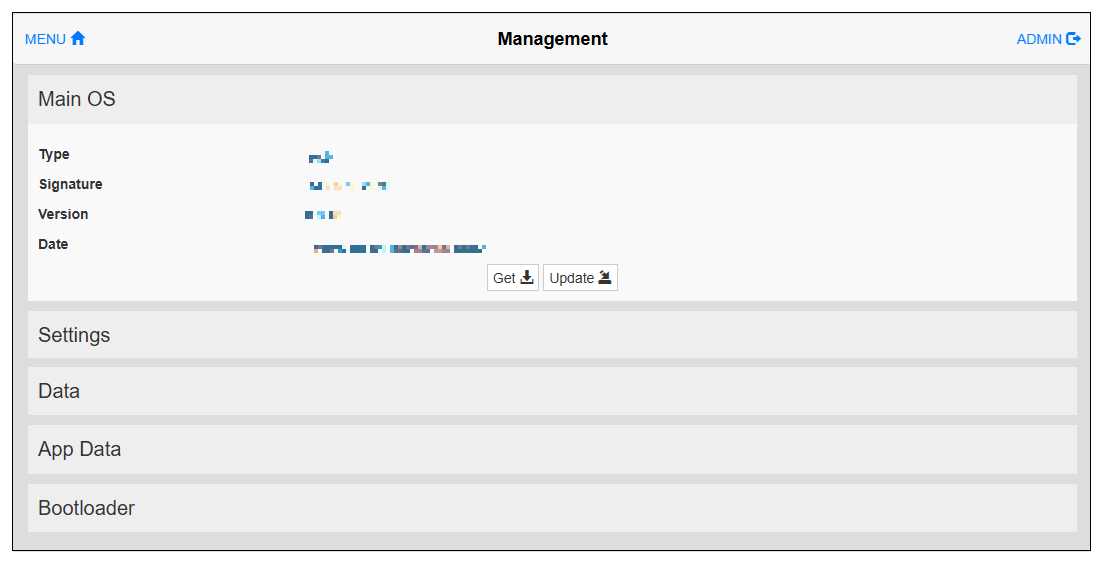
- From the menu, select Management.
- Expand Main OS and
click the Update button.
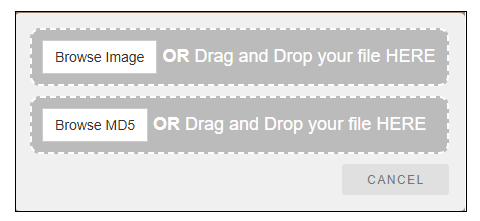
- A dialog box will appear. Click Browse Image and select the update file (.img). Then click Browse MD5 and select the MD5 checksum file (.md5).
 NOTE:
NOTE:-
Prepare the MD5 checksum file beforehand and store it in the same external storage as the update file.
On the Internet, find a tool to calculate the MD5 checksum of the file.
On Windows 10, you can also use the "CertUtil" utility from the command line. For example:CertUtil -hashfile mainos.tar.img MD5 > mainos.tar.img.md5(Replace the underlined portions in the above command with the update file name.)
-
The MD5 checksum file should have the same name as the file to load, with the file extension ".md5".
-
The MD5 checksum file should have only one line. If the utility that calculates the checksum generates a file with multiple lines, delete the additional lines.
-
- Restart the product.