

SiteManager
This function is available only to administrator accounts.
When using a PC or tablet to display and operate HMI products installed in remote locations, it is necessary to build a system that prevents unauthorized access by external entities. By installing Pro-face Connect (sold separately), you can build a secure remote access system.
Pro-face Connect consists of our HMI products on the work site (SiteManager), computers or tablets in the office (LinkManager), and a server to connect them (GateManager).
For more
information about Pro-face Connect, refer to our website.
https://www.pro-face.com
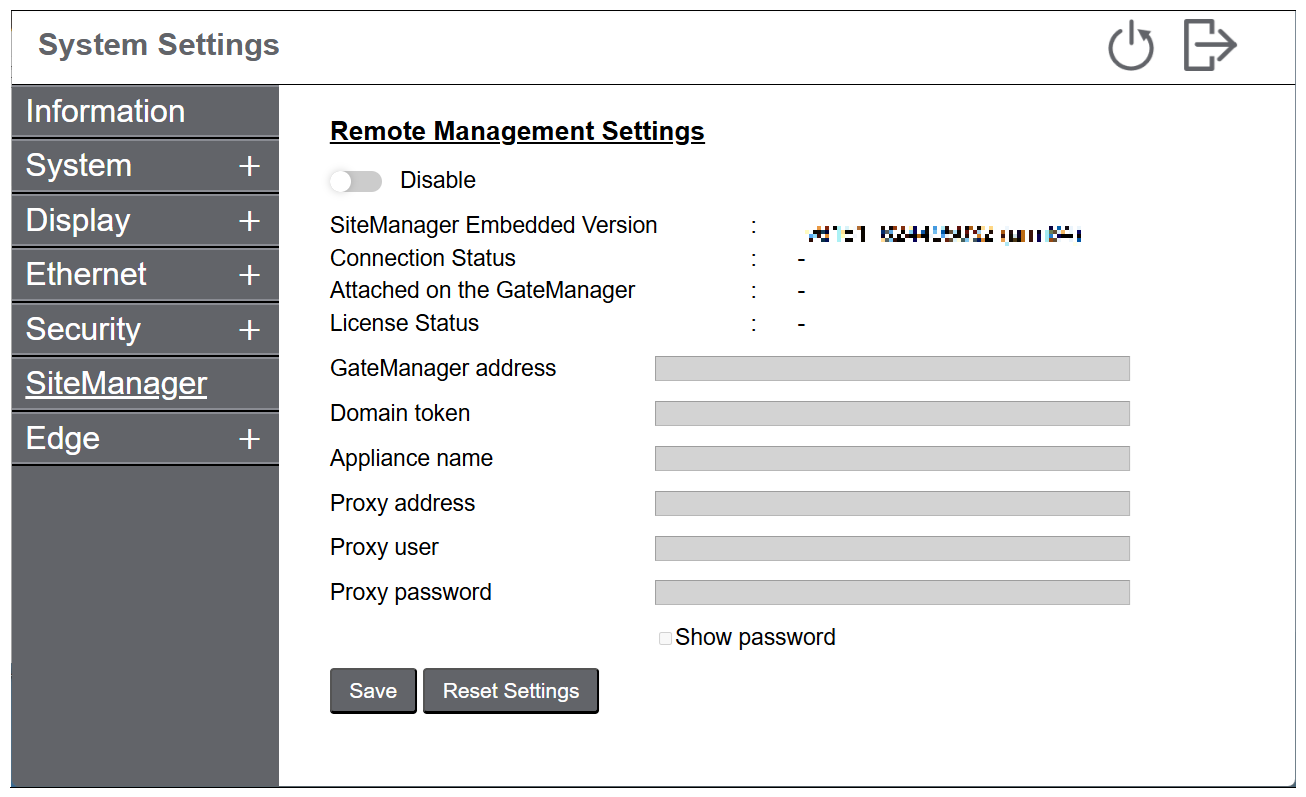
|
Function |
Description |
|---|---|
| Remote Management Settings |
Enables the SiteManager function to remotely access this product with Pro-face Connect. Default: Disable |
| GeteManager address/ Domain token |
Enter the IP address of the GateManager you want to access and the password (token) to connect to the GateManager. This information can be found at the bottom of the GateManager X.509 certificate emailed to you from GateManager. |
| Appliance name |
Enter the name of the target device (the name of SiteManager). The name set here is displayed on the GateManager. |
| Proxy address/Proxy user/Proxy password |
If required, enter the proxy server IP address, account name, and password. For proxy server information, consult your network administrator. |