For models that support the start screen, refer to the following.
 1.4 Supported Features
You can set up a screen that displays while the display unit is starting up (from when the power is turned on until touch operation is possible).
For models that support the start screen, refer to the following.
1.4 Supported Features

When the start screen settings have not been set up, the display at startup varies depending on the model.
GP6000 Series, ST6000 2nd Gen Series: Only the progress bar is displayed.
SP5000 Series (excluding Open Box): The start screen defined by the system is displayed.
GP4000 Series, LT4000 Series, ET6000 Series, ST6000 Series (except for the 2nd Gen), STM6000 Series, STC6000 Series: A message appears after the startup of the operating system.
The startup screen orientation is based on the display unit orientation.
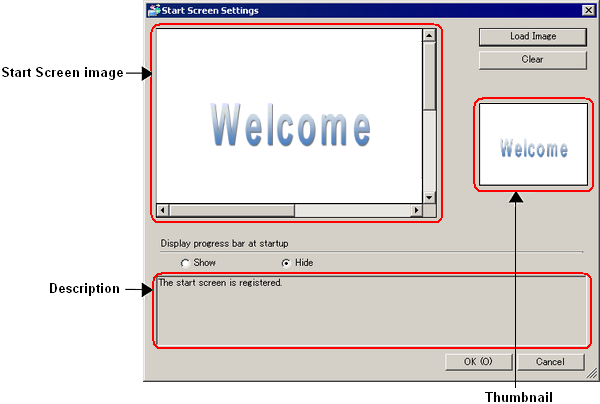
Start screen image preview
Displays images loaded using the [Load Image] command.
If the specified image dimensions are larger than the display unit screen, the image is loaded with reduced screen dimensions.
If the specified image dimensions are smaller than the display unit screen, the image is displayed in the center of the screen with a black background.
Load Image
Loads the image you want to display at start up.
You can select BMP, JPEG, DPD, or PNG files.
The display color of the loaded image is converted as follows depending on the display unit model.
GP-4100 Series: 65,536 colors
GP4000 series (excluding the GP-4100 series), LT4000 series: 16,384 colors
SP5000 Series Advanced Display: 65,536 colors
SP5000 Series Premium Display: 4,194,304 colors
SP5000X Series eXtreme Display: 65,536 colors
Other models: 16,777,216 colors
Loading images does not affect the display unit's screen area.
Reverse Black/White and Get
Specifies whether to reverse the image's black and white colors.
Fix Aspect Ratio
Specifies whether to fix the image's aspect ratio (width/height ratio) if it needs to be shrunk to fit the screen area.
Clear
Erases the start screen image.
Start screen full image preview
If the selected image is larger than can be displayed in the Start screen image preview, a preview of the full image is available here.
Display progress bar at startup
Specifies whether to display a progress bar during start up. Select [Show] to display the startup progress from the time the display unit is turned ON until the initial screen is displayed.
If you do not set up [Load Image], the progress bar will always display.