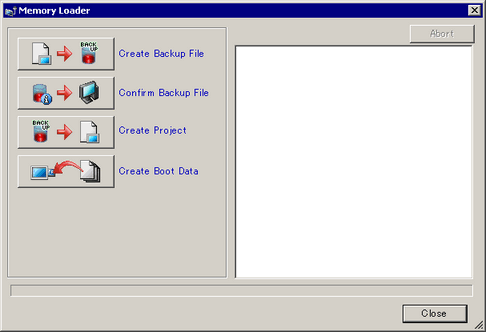
Create Backup File
In the destination folder you selected in [Select Folder], create backup data (*.cml or .cmlx) for the project currently open in GP-Pro EX (or the project selected in [Select project]) and the memory loader to start the data on the display unit. Please select the external storage root folder as the destination.
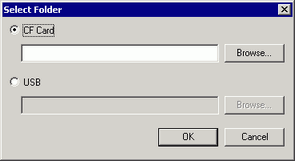

Selection cannot be made in the following cases.
When selecting IPC series as the unit type
When you have not selected a project file to send using the Transfer Tool
If the [CF Card Folder] (or [SD Card Folder]) or [USB Storage Folder] is already set up, the folder path is displayed. Move or copy all generated data to the external storage root folder.
In the [Transfer Settings], when [Set up initial connection key] is selected, select whether to set the connection key on the display unit. By setting the connection key on the display unit, you can skip having to enter the connection key whenever restarting the display unit.
Confirm Backup Data
[System Information], [Project Information], [Backup Size], and the names and dates of each backup file.
To compare two project files, use the Project Comparison Tool. (In [Confirm Backup Data], size differences may arise due to internal data.)
 3.8.4.6 Utility - Compare Project
Create Project File
You can create a project file from backup data (*.cml or .cmlx).
Create Boot Data
In the destination folder that you selected in [Select Folder], create the Memory Loader Tool used for transferring data between the external storage device and the display unit. Please select the external storage root folder as the destination.
Selection cannot be made in the following cases.
When selecting IPC series as the unit type
When you have not selected a project file to send using the Transfer Tool
If a destination folder is already selected with another feature, that folder path is shown. Move or copy all generated data to the external storage root folder.
Backup file default name
The backup file default name that is created depends on the display unit model.
|
Display unit model |
Backup file default name |
|
SP5000 Series Open Box |
MEM5B40L.CMLX |
|
SP5000 Series Power Box, Standard Box, eXtreme Box |
MEM5B10L.CML |
|
GP4000 series (excluding the GP-4100 series) |
MEM4X0X.CML |
|
GP-4114T, GP-4115T, GP-4116T |
MEM411XP.CML |
|
GP-4115T3 |
MEM411XM.CML |
|
LT4000 Series |
MEM4X0XC.CML |
|
ST6000 series (except for the 2nd Gen) |
MEM6X0XM.CML |
|
STM6000 Series |
MEM6X0XQ.CML |
|
STC6000 Series |
MEM6X2XO.CML |
|
ET6000 Series |
MEM6X0XN.CML |