-
To check which models support the IPsec function, refer to the following.
 1.4 Supported Features
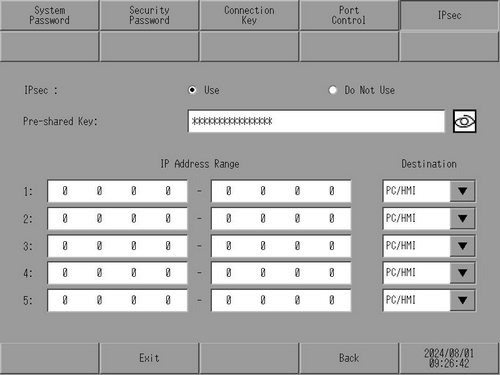
Settings for secure Ethernet communication using IPsec.
To check which models support the IPsec function, refer to the following.
1.4 Supported Features
|
For example, GP6000 Series |
For example, SP5000 Series |
|
|
|
IPsec
Select whether or not to use IPsec. The initial setting is [Do Not Use].
Pre-shared Key
Specify 16 characters for the Pre-shared Key. The Pre-shared Key must include one upper-case alphabetic character, one lower-case alphabetic character, a number and one symbol. The following symbols can be used for the Pre-shared Key.
~ ! @ $ % ^ & * _ + - = ` \ ( ) [ ] : " ' < > { } # ;
Click the  icon to view the Pre-shared Key.
IP Address
Set the destination IP addresses of Ethernet communication. You can set multiple IP addresses. No duplication of IP addresses is allowed.
You cannot specify an IP address range.
IP Address Range
Set the destination IP addresses of Ethernet communication. You can set multiple IP addresses. No duplication of IP addresses is allowed.
When you want to set an IP address range, set the start and end IP addresses.
(Example) 192.168.1.10 – 192.168.1.99
When you want to specify an individual IP address, set only the starting IP address.
(Example) 192.168.1.100 – 0.0.0.0
Destination
Select the destination type.
PC/HMI
Select when the destination is a display unit or a PC.