31.8.1 Procedure - Controlling External I/O in STC6000 Series and TM3 Modules
Settings for the TM3 modules are shown below.
-
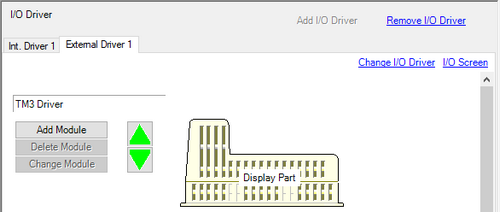
From the [Project] menu, point to [System Settings] and click [I/O Driver]. Click the [External Driver] tab.
-
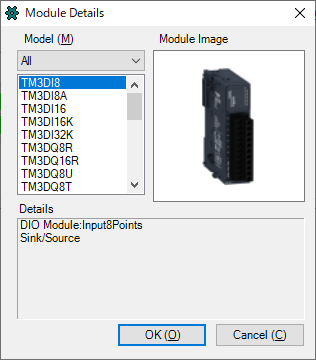
Click [Add Module] to display the [Module Details] dialog box. Specify the TM3 module type and click [OK].
-
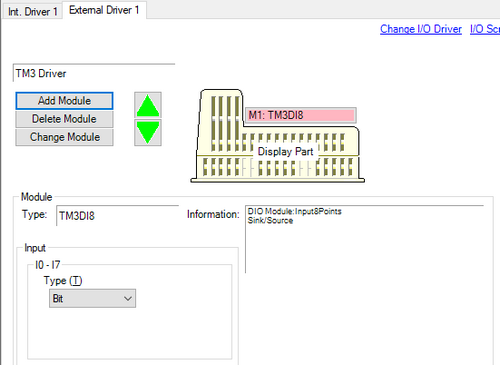
The module-specific settings appear. For details about each, see the Settings Guide.
-
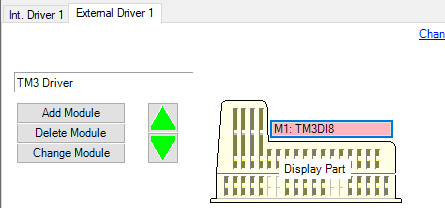
To add, change, and delete modules, click the module and one of the buttons shown below.

-
A limited number of units can be connected to a TM3 module. Please refer to the following for details.
 31.8.4 Restrictions - STC6000 and TM3 Module - Number of TM3. Modules That can be Connected
-
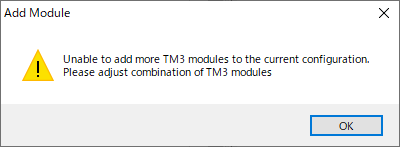
If the number of connected units exceeds the limit, the following dialog box will appear when you click the [Add Module] button.
Adjusting the Communication Processing Cycle Time
You can adjust the idle time between TM3 module communication processing and between communication processing cycles by using the #L_IOMasterDrv[0] system variable.
Frequent communication between the display unit and TM3 modules may slow down the speed of other processing. You can reduce the communication frequency with TM3 modules and optimize the processing performance of the entire display unit by increasing the idle time between TM3 module communication processing and between communication processing cycles.
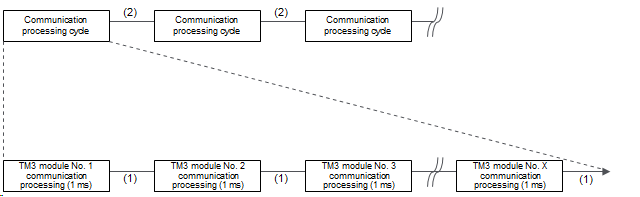
(1) Idle time between TM3 module communication processing
(2) Idle time between communication processing cycles
* The communication processing time for TM3 modules is a standard 1 ms and cannot be changed.
Example of Calculating the Communication Processing Cycle Time
The method to calculate the communication processing cycle time is described here based on the following conditions.
A) Communication processing time for TM3 module: 1 ms
B) Idle time between TM3 module communication processing: 2 ms
C) Number of TM3 modules: 4
D) Idle time between communication processing cycles: 3 ms
[Formula for calculating communication processing cycle time]
(A + B) * C + D
[Calculation result with above conditions]
(1 + 2) * 4 + 3 = 15 ms
#L_IOMasterDrv[0]
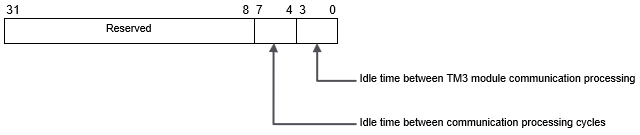
Bit 0 to 3
Set the idle time between TM3 module communication processing between 0 ms and 15 ms in increments of 1 ms. If the value is 0, the idle time is handled as 1 ms as an exception. The default value is 0.
Bit 4 to 7
Set the idle time between communication processing cycles between 0 ms and 15 ms in increments of 1 ms. The default value is 0.