
-
Select the termination character as either [CR] or [CR+LF].
Setting for connecting a bar code reader.
Select the termination character as either [CR] or [CR+LF].
Port
Select the port to connect: [USB/SIO(RS232C)], [USB], or a serial port such as [COM1].
Ports that support barcode readers vary by model. See the following for more details. 15.7.1 Bar Code Restrictions
COM1*, USB/SIO(RS232C)
Select when connecting to the USB/SIO(RS232C) port or a serial port, such as COM1.
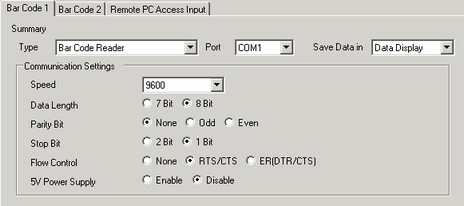
Speed
Select a communication speed from [2400], [4800], [9600], [19200], [38400], [57600] or [115200].
Data Length
Choose the communication data length from [7 bit] or [8 bit].
Parity
Select the communication parity bit: [Even], [Odd] or [None].
Stop Bit
Choose the communication stop bit length: [1 bit] or [2 bit].
Flow Control
Select the communication control method: [None], [RTS/CTS Control], or [ER(DTR/CTS) Control].
If you selected [USB/SIO(RS232C] for the [Port], this property is fixed to [None].
5V Power Supply
Designate whether or not to set the 5V power supply.
If you selected [USB/SIO(RS232C] for the [Port], [Disable] is selected automatically.
USB
Select this when connecting to the USB port.
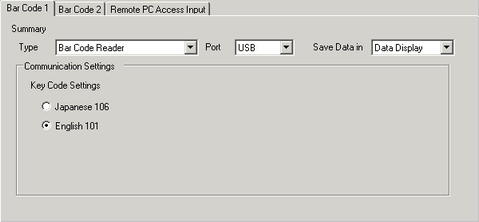
Key Code Settings
Select the text type that the barcode reader reads: [Japanese 106 Keypad] or [English 101 Keypad].