Properties (Logging Group)
| [Max Record] 'DataLogging.(Logging Group Name).MaxRecord' |
Set how much logging data to save. When logging data exceeds the set value, the process specified by the [Operation When [Save in] Is Full] field is executed. Setting Value Range: 0 - 2147483647 |
Data Binding Support: To use as a Binding Source, refer to the
following. For more information of Data Binding concept,
refer to the following. |
| [Condition Type] |
Select the condition for collecting logging data: |
For information on [Data Logging], refer to the following. |
When selecting [ValueChange] in [Condition Type]When selecting [ValueChange] in [Condition Type]
| [Execution Condition] |
Select the condition for execution of collecting logging
data: |
| [Trigger Variable] |
Set the variable that controls the collection of logging
data. |
Data Binding Support: When used as a Binding Target, the Binding
Sources that can be associated are as follows. For more information of Data Binding concept,
refer to the following. |
 Variable]
When selecting [Periodic] in [Condition Type]When selecting [Periodic] in [Condition Type]
| [Units] |
Select the unit for the frequency of collecting logging
data. |
| [Interlock] |
Set a BOOL type variable for stopping the collection of
logging data. While the variable value is ON, stops collecting
logging data. |
Data Binding Support: When used as a Binding Target, the Binding
Sources that can be associated are as follows. For more information of Data Binding concept,
refer to the following. |
| [Enable] |
Saves logging data on the display unit to a file. |
For information about exporting and importing, refer to the
following. |
| [Data Storage] |
Select the export file location from the following. |
|
| [Append Date/Time] |
At the end of the file name of the exported, append the
export date and time. |
|
| [Detect Modification] |
Detects modifications to the exported file. Use the Export File Validation tool to detect modifications. |
When [Detect Modification] is enabled, an alphanumeric string
is added to the first line of the exported file. This string is
used by the Export Validation Tool to detect modifications to
the file data. When using the Export Validation Tool, do not erase
or modify this string. |

| [Folder Name] '(Logging Group Name).ExportData.FolderName' |
Set the name of the folder. (Example: \Log) |
On the IPC Series, to use a specific language for folder and file names, set up in [Control Panel] > [Change system locale]. Data Binding Support: To use as a Binding Source, refer to the
following. When used as a Binding Target, the Binding
Sources that can be associated are as follows. For more information of Data Binding concept,
refer to the following. |
| [File Name] '(Logging Group Name).ExportData.OutputFileName' |
Set the name of the exported file. (Example:
LogData) |
On the IPC Series, to use a specific language for folder and file names, set up in [Control Panel] > [Change system locale]. Data Binding Support: To use as a Binding Source, refer to the
following. When used as a Binding Target, the Binding
Sources that can be associated are as follows. For more information of Data Binding concept,
refer to the following. |
| [Save Status] '(Logging Group Name).ExportStatus.SaveStatus' |
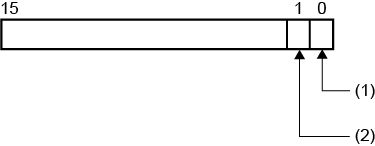
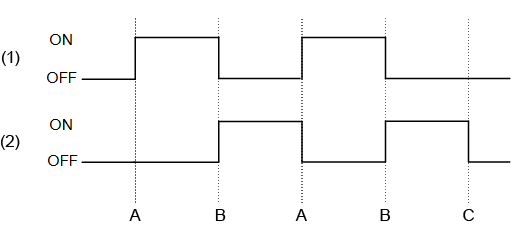
Set an integer variable to store the start and completion status of the export process. From the property marker, select [Variable]. |
When exporting, the following is stored in the save status. Data Binding Support: To use as a Binding Source, refer to the
following. When used as a Binding Target, the Binding
Sources that can be associated are as follows. For more information of Data Binding concept,
refer to the following. |
| [Error Status] '(Logging Group Name).ExportStatus.ErrorStatus' |
Set an integer variable for storing the result of the export process. From the property marker, select [Variable]. |
When the end bit (bit position:1) of the variable specified in the [Save Status] field is ON, the following results appear in the error status. Data Binding Support: To use as a Binding Source, refer to the
following. When used as a Binding Target, the Binding
Sources that can be associated are as follows. For more information of Data Binding concept,
refer to the following. |