Self Download
Use the [Self Download] operation to get a BML file (used for file system transfer) from the FTP server and transfer it to the display unit.
Block
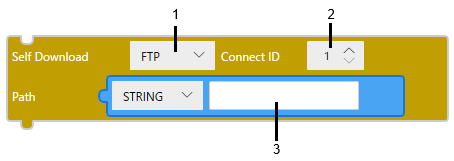
Text
selfDownload($Enum.Server.FTP, 1, SERVER_PATH);
1 2 3
1: Server type
2: Connect ID
3: Path
| Server type | Only option [FTP] is available. |
| [Connect ID] |
The connection ID of the server to connect to, as an integer. The connection ID must be the ID set in the [FTP Connections] field in the [Project Explorer] window. |
| [Path] |
Specify the path of the BML file and folder on the server. (Example) /Data1/package.BML
|
- After completing transfer preparation, the runtime process initiates a self-termination sequence and hands control over to the transfer process. If other processes are still running, the runtime waits for them to complete. If they do not terminate within 25 seconds, each remining process is forcibly terminated, and the transfer process is started.
- Do not disconnect from the FTP server while downloading files for file system transfer.
- Multiple [Self Download] operations cannot be performed at the same time.
- If the size of the BML file exceeds 1 GB, the [Self Download] operation does not work.
(Example)
If you want to download the package.BML file from the folder /Data1/ on the FTP server with an FTP connection ID of 1 to the display unit, set the following script.
Block
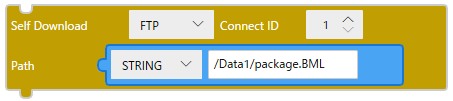
Text
selfDownload($Enum.Server.FTP, 1, “/Data1/package.BML”);