Trend Graph
Use trend graph operations to manipulate a trend graph.
For information on the naming convention and script keywords, refer to
the following.
Naming Conventions
Naming Conventions
Block
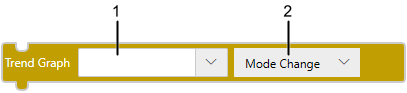
Text
changeTrendGraphMode($GraphicObject.TrendGraph1);
2 1
1: Trend Graph
2: Operation
You can use these operations to perform the following:
- Change between historical mode and real-time mode
- Move the cursor position
- Move the time axis
Settings in Trend Graph:
| [Mode change] |
Block[Mode change] TextchangeTrendGraphMode(TRENDGRAPH); |
Enables changing between Historical and Real-time modes. |
| [Move Cursor to New data point] |
Block[Move Cursor to New data point] TextmoveTrendGraphCursor(TRENDGRAPH, $Enums.DataPoint.New, 1); |
In historical mode, move the cursor position display forward by the specified amount. |
| [Move Cursor to Past data point] |
Block[Move Cursor to Past data point] TextmoveTrendGraphCursor(TRENDGRAPH, $Enums.DataPoint.Past, 1); |
In historical mode, move the cursor position display backward by the specified amount. |
| [Move Graph plot to New time] |
BlockTextmoveTrendGraphPlot(TRENDGRAPH, $Enums.GraphPlot.NewTime, 1, $Enums.Time.Day); |
In historical mode, move the displayed time axis forward to the specified time. |
| [Move Graph plot to Past time] |
BlockTextmoveTrendGraphPlot(TRENDGRAPH, $Enums.GraphPlot.PastTime, 1, $Enums.Time.Day); |
In historical mode, move the displayed time axis back to the specified time. |